

Rider Registration
Our Rider Registration Form has to be competed by all those riding at the Centre
To ensure your safety and to enable us to fully understand your abilities we ask all riders to complete our Rider Registration form – You can download two file types for completion and return.
- An Excel Spreadsheet (can be opened in Microsoft Office or by completed by using using Google Docs Online – See below* for how to use)
- A PDF copy which can be printed and completed by hand and then posted/scanned and emailed or given to us personally.
DOWNLOAD EXCEL REGISTRATION FORM HERE
DOWNLOAD PDF COPY OF REGISTRATION FORM HERE
*To open the Excel spreadsheet in Google Docs if you cannot open an Excel Spreadsheet
- Click on this link and save file to your computer. (you do not need to open it)
- Go to https://docs.google.com/document
- Select Start New Document (Click here to see Screenshot)
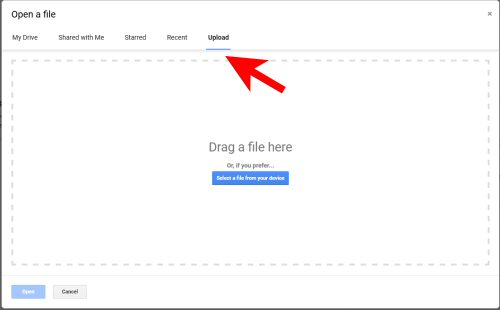
- Upload Our Registration Form you have saved to your pc (Click to see Screenshot)
- Complete all boxes in Form
- Once completed you can download your completed form by selecting File/Download and then selecting the Microsoft Excel (.xlsx) Option (Click to see Screenshot)
- Once saved to your PC please email it to us as an attachment.



Pony Club Linked Centre

Accredited Coach
